
Launch steps
Start your whole sim room with one tap.
One tile turns on your lights. Then it opens your launch monitor, your golf program, Touch Controls and your info screen in the order you set.
 1:14
- Put each program on the screen you choose
- Open a program normal, minimized or maximized
- Wait until a program is running, or wait 1 to 120 seconds, before the next step
- Close the other programs and your info screen when your golf program closes
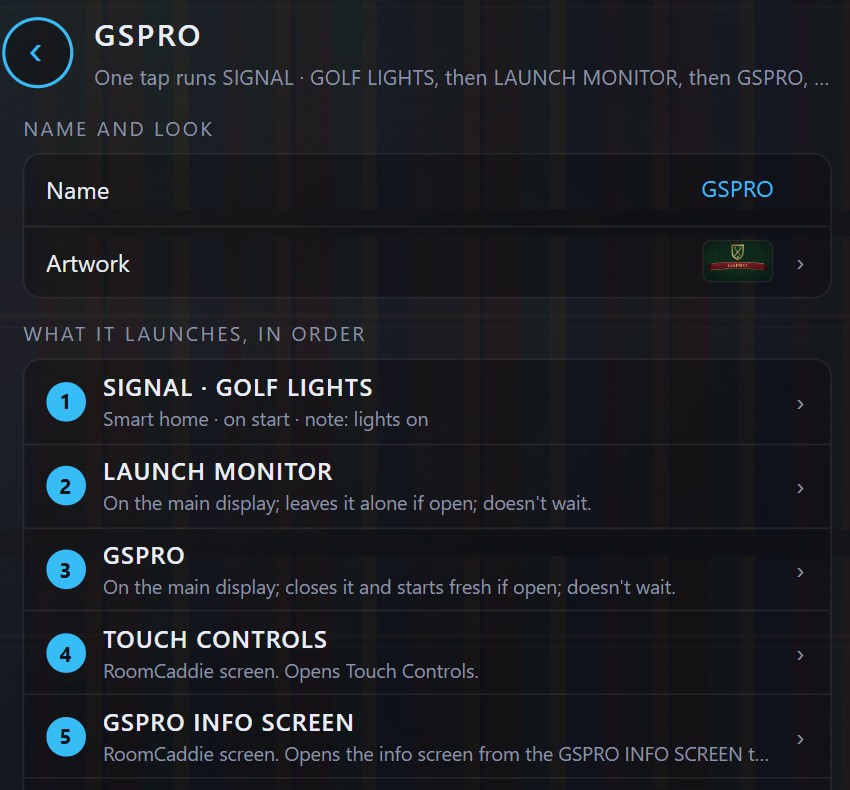
See the five steps on the GSPRO tile
- For an open program, choose: Leave it, start it again, or close it and start fresh
- Send a signal to your smart home to turn on the lights
- Move a step earlier or later with a tap
Your sim room, finished.
Buy RoomCaddie · $49
- No account. No subscription. No tracking.
- $49, one time purchase, 14-day refund
- One key for up to three of your own PCs
Already purchased? Download RoomCaddie
The key and the download arrive by email within minutes. Windows 11. English. Sold worldwide.